AIR Native Extension (ANE): The Ultimate Developer Guide for 2026
Introduction
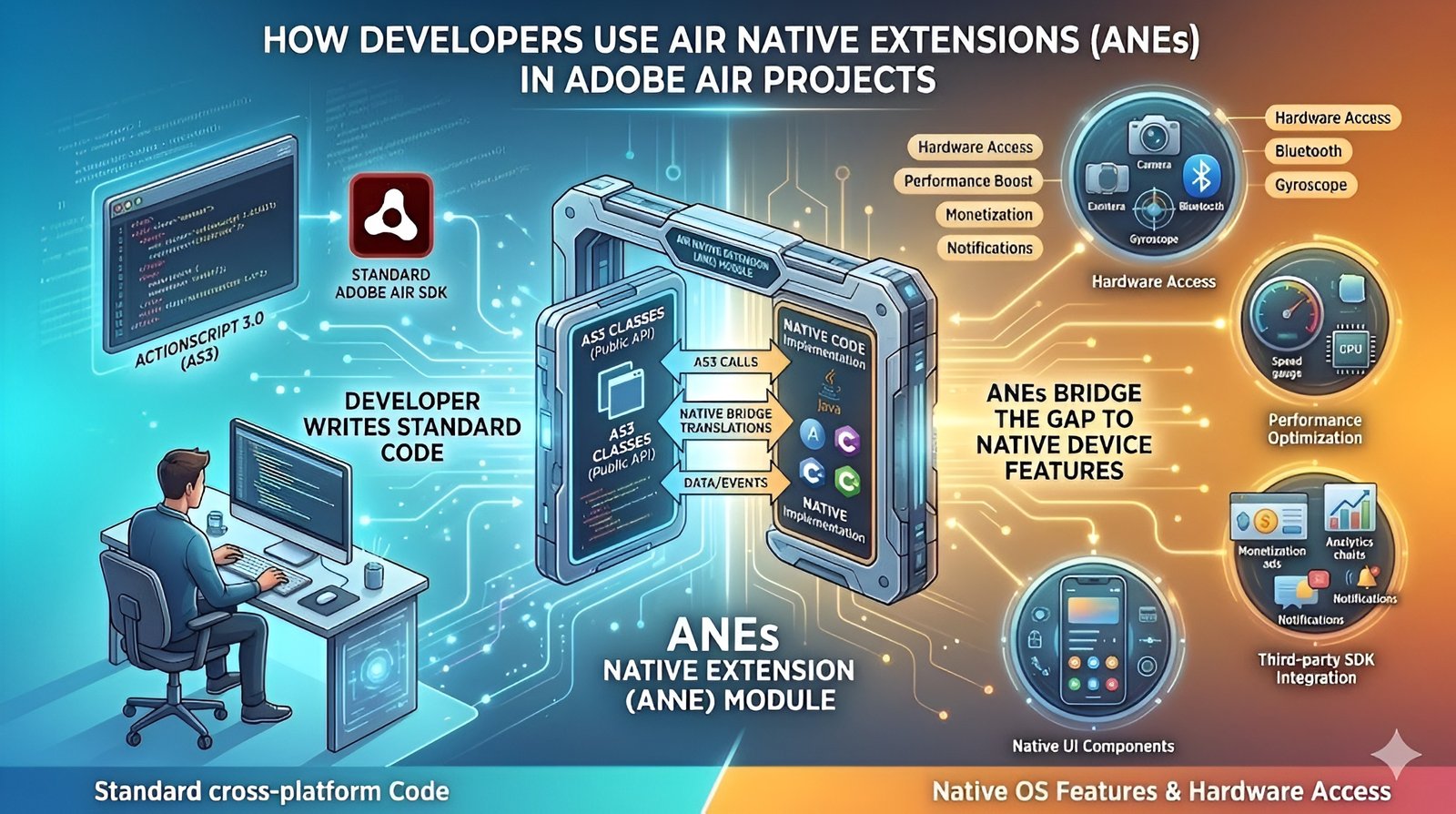
In the modern cross-platform development landscape of 2026, the AIR Native Extension (ANE) remains the most critical tool for developers using the Adobe AIR (Harman) ecosystem. While AIR provides a robust framework for building apps that run on iOS, Android, and Desktop from a single codebase, it cannot natively include every single API provided by Apple or Google. An ANE acts as a sophisticated bridge, allowing developers to step outside the ActionScript virtual machine and execute platform-specific code.
This capability is what allows AIR to compete with frameworks like Flutter or React Native. By using ANEs, you aren’t just building a “web-wrapper” or a basic app; you are creating a high-performance, fully integrated native experience. Whether you are building a complex gaming engine or a high-security fintech application, ANEs provide the “extra gear” needed to access system-level features that are otherwise off-limits to standard ActionScript 3.0 libraries.
Understanding the Core Architecture
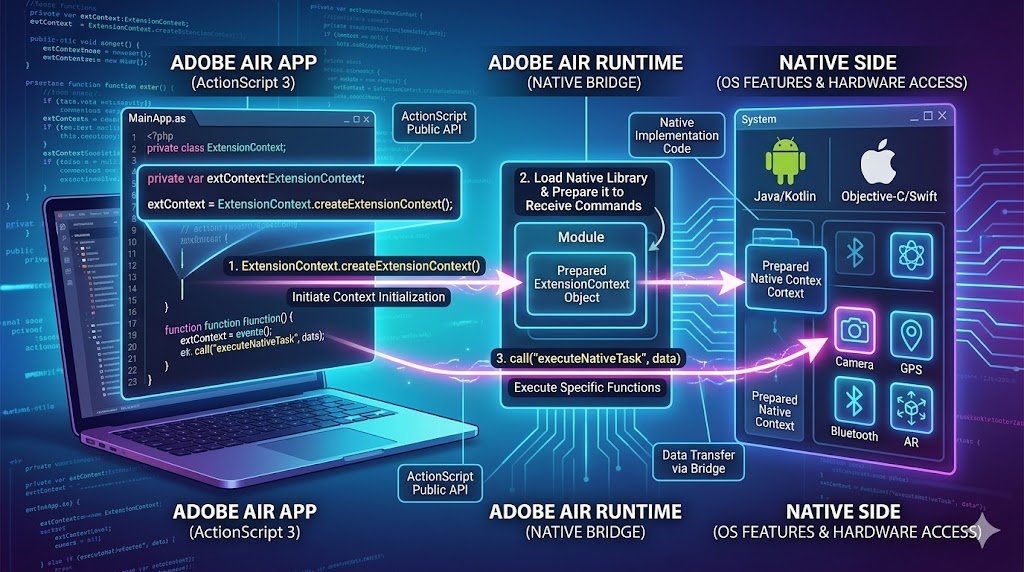
The architecture of an AIR Native Extension is a masterpiece of dual-layer engineering. It consists of two distinct yet inseparable parts: the ActionScript 3.0 (AS3) library and the Native Implementation. The AS3 side provides the public-facing API that you, the developer, interact with inside your main project. This layer is responsible for data serialization and calling the specialized ExtensionContext class.
On the other side of the “bridge” sits the native code, written in languages like Java/Kotlin for Android, Objective-C/Swift for iOS, or C++/C# for Desktop platforms. These two sides communicate through a low-latency messaging protocol. When you call a function in AS3, the Native Bridge translates that request into a command the operating system understands. This separation allows you to maintain a clean, cross-platform codebase while delegating the “heavy lifting” or hardware-specific tasks to the native OS environment, ensuring total compatibility.
The Native Bridge
The “Native Bridge” is the heartbeat of any AIR Native Extension. This bridge facilitates the bidirectional flow of data between the AIR runtime and the native platform. To send data from ActionScript to Native code, the extension uses call() methods that pass variables which are then mapped to native types (like mapping an AS3 String to a Java String). Conversely, to send data back from the Native side to AIR, the extension dispatches StatusEvents.
This event-driven communication is vital for asynchronous tasks, such as waiting for a GPS coordinate or a response from an in-app purchase window. In 2026, the efficiency of this bridge has been highly optimized by Harman, reducing the overhead of context switching. Understanding how to manage this data flow particularly avoiding the “chattiness” of too many small calls is the hallmark of an expert AIR developer looking to maintain ultra-smooth UI performance.
Why ANEs are the Lifeblood of Modern Adobe AIR Development
Without AIR Native Extensions, Adobe AIR would be a closed garden, unable to keep up with the rapid release cycles of modern mobile operating systems. Every year, Apple and Google release new hardware features such as FaceID, advanced Haptic engines, or Neural Processing Units (NPUs).
Since the AIR SDK cannot be updated every week to include these features, ANEs allow the community to implement support immediately. This “plugin-based” growth model ensures that AIR remains a “living” platform. Developers rely on ANEs for everything from simple tasks like showing a native alert box to complex integrations like ARKit or real-time biometric authentication.
In the current market, the ability to rapidly integrate new native SDKs via ANEs is the primary reason many major corporations continue to choose AIR for their enterprise mobile strategies, as it combines the speed of ActionScript with the power of native APIs.
Achieving Peak Performance with Native Code Offloading
One of the most overlooked benefits of an AIR Native Extension is its capacity for raw performance optimization. While ActionScript 3.0 is highly efficient for UI and general logic, it is an interpreted language running on a virtual machine. For computationally expensive tasks such as real-time image processing, complex physics calculations, or high-fidelity audio synthesis native code (C++ or Swift) is significantly faster.
By offloading these CPU-intensive tasks to an ANE, you free up the AIR main thread to focus on rendering and user interaction, which prevents “jank” and dropped frames. In 2026, with the rise of AI-driven features in mobile apps, developers are increasingly using ANEs to run local machine learning models directly on the device’s GPU or NPU. This hybrid approach allows AIR apps to achieve “native-tier” performance metrics that are indistinguishable from apps built entirely in Xcode or Android Studio.
Integrating Third-Party SDKs: AdMob, Firebase, and Beyond
In the world of professional app development, third-party SDKs are mandatory for monetization, analytics, and cloud services. However, companies like Google and Meta rarely provide a direct ActionScript library; they provide Android (.aar) and iOS (.framework) libraries. This is where the AIR Native Extension becomes an essential tool. By “wrapping” these native libraries into an ANE, you can use industry-standard tools like AdMob for advertising, Firebase for real-time databases and push notifications, or Adjust for attribution tracking.
This “wrapping” process involves creating an AS3 interface that maps to the SDK’s native functions. This is the primary way modern AIR apps monetize and stay connected to the cloud. Without ANEs, an AIR app would be an island, unable to communicate with the vast ecosystem of modern digital marketing and backend services that define the mobile economy in 2026.
Accessing System-Level Hardware
The standard AIR SDK provides access to basic sensors like the accelerometer, but for more specialized hardware, an AIR Native Extension is required. If your project involves connecting to external hardware via Bluetooth LE (Low Energy), scanning a specialized NFC tag, or using a laser barcode scanner on a ruggedized device, you must use an ANE. These extensions allow you to tap into the “raw” hardware APIs provided by the OS.
This is particularly crucial for “Internet of Things” (IoT) applications where the app serves as a control hub for physical devices. By using an ANE, you gain granular control over hardware parameters such as adjusting camera focus modes, managing specialized battery-saving states, or accessing the secure enclave for cryptographic operations.
This deep hardware integration allows AIR to be used in industrial and medical fields where precise control over the device’s physical capabilities is a non-negotiable requirement for safety and accuracy.
Anatomy of an ANE: The Files and Folders Behind the Package
To the uninitiated, an AIR Native Extension looks like a single .ane file, but it is actually a carefully structured archive. Inside, it contains several critical components: the extension.xml descriptor (which tells AIR which native classes to link to), the library.swc (the ActionScript API), and the platform-specific binaries (like .a or .framework for iOS, and .jar or .aar for Android). Understanding this anatomy is vital for troubleshooting and packaging.
The extension.xml file is particularly sensitive; it defines the extension’s ID and specifies which platforms are supported. If this file is misconfigured, the app will fail to compile or, worse, crash on startup. In 2026, modern build tools have automated much of this, but a top-tier developer still knows how to manually inspect these internals to ensure that the extension is optimized for the target architecture, such as ARM64 for modern iPhones or x86_64 for desktop simulators.
Android Development
When building an AIR Native Extension for Android, developers typically work within the Android Studio environment. In 2026, while Java remains supported, Kotlin has become the preferred language for native Android development due to its safety features and conciseness. An Android ANE requires a “Native Extension Context” which handles the lifecycle of the extension within the Android Activity.
Developers can use this context to launch Intents, request permissions at runtime, or interact with Google Play Services. A common challenge in Android ANE development is managing dependency conflicts for example, when two different extensions try to use different versions of the same Google library.
Mastering the use of Gradle and ensuring that your ANE is “AndroidX” compliant are essential skills for creating stable, production-ready extensions that can survive the diverse and often fragmented Android device ecosystem without causing system-level errors or crashes.
iOS Development: Objective-C, Swift, and the Apple Ecosystem
Building an AIR Native Extension for iOS requires a deep understanding of Apple’s strictly regulated environment. Most modern iOS ANEs are written in Objective-C or Swift. Swift integration is particularly powerful but requires a “Swift Support” addition to your AIR project to ensure the necessary runtime libraries are included in the final .ipa package. iOS ANEs are often used to handle features like “Sign in with Apple,” Apple Pay, and intricate UI interactions like Haptic Touch.
Because iOS is a “closed” system, permissions (like access to the Camera or Microphone) must be carefully declared in the ANE and the main app’s descriptor file. One of the biggest advantages of iOS ANEs is their stability; because Apple controls both the hardware and software, a well-written iOS extension tends to be incredibly reliable. However, developers must stay vigilant regarding Apple’s “App Store Review Guidelines,” ensuring their ANEs don’t use private APIs that could lead to an app’s rejection.
Desktop ANEs: Expanding Power to Windows and macOS
While mobile is the primary focus, AIR Native Extensions are equally powerful for desktop applications. For Windows (.dll) and macOS (.framework), ANEs allow AIR to function like a native desktop application. This includes tasks like deep file system integration, registry editing on Windows, or controlling native window borders and transparency.
In 2026, desktop ANEs are frequently used for enterprise software, such as POS (Point of Sale) systems that need to communicate with receipt printers and cash drawers via USB or Serial ports. For macOS, ANEs are essential for supporting features like the Touch Bar or integrating with Apple’s “Metal” graphics API for hardware-accelerated rendering.
Desktop ANEs bridge the gap between a “web-style” app and a powerful system utility, giving developers the ability to create professional-grade software that feels right at home on any desktop operating system, with all the power of a native C++ application.
Packaging Your ANE: The AIR Developer Tool (ADT) Workflow
The process of turning your code into a usable AIR Native Extension involves the AIR Developer Tool (ADT). This command-line utility is the “compiler” that bundles the ActionScript and Native components into the final .ane file. The workflow typically involves compiling your AS3 code into a .swc, gathering your native binaries, and then running a complex ADT command that specifies the paths to all these assets and the extension.xml descriptor.
In 2026, many developers use build scripts (like Ant, Gradle, or custom Python scripts) to automate this, as the command-line parameters can be quite lengthy. Accurate packaging is the most common hurdle for new ANE developers. If a single library is missing or a path is slightly off, the extension will be “invalid.” Learning the nuances of the ADT packaging process including how to sign your extension with a certificate is a foundational skill for anyone serious about distributing their own native extensions.
Common Pitfalls: Troubleshooting ANE Integration Issues
Even for experienced developers, integrating an AIR Native Extension can be a minefield of “Error 306” and “Missing Namespace” messages. The most frequent pitfall is a mismatch between the extension ID in the extension.xml and the main app’s descriptor. Another common issue is “Native Library Not Found,” which usually happens when the ANE was packaged without the correct binaries for the target architecture (e.g., trying to run a 32-bit ANE on a 64-bit device).
In 2026, as OS security becomes stricter, “Permission Denied” errors are also common; these occur when the ANE tries to access hardware like the camera without the main app having the correct Info.plist or Manifest declarations. To troubleshoot effectively, developers must learn to use the adb logcat tool for Android and the Xcode “Console” for iOS, as these tools provide the low-level system logs that reveal why an ANE is failing where ActionScript’s debugger cannot see.
Advanced Debugging: Peeking Inside the Native Bridge
Debugging an AIR Native Extension requires a “multi-lingual” approach. Since the code exists in two different environments, a standard breakpoint in your ActionScript editor won’t show you what’s happening in the Java or Swift code. Advanced developers use “Remote Debugging” techniques. For Android, you can attach the Android Studio debugger to the running AIR process to step through your Java code in real-time.
For iOS, you can open the generated Xcode project (when using a simulator or a direct-to-device build) to debug the Objective-C or Swift side. Adding extensive “Log” statements on both sides of the bridge is also a standard practice. In 2026, the complexity of native code has increased, making these debugging skills even more valuable. Being able to trace a variable as it leaves ActionScript, crosses the bridge, and enters the native OS layer is the only way to solve the most difficult “ghost in the machine” bugs that plague complex ANEs.
The Role of Harman: The Evolution of AIR and ANE Support
Since Harman took over the development of Adobe AIR from Adobe, the framework has seen a massive resurgence in stability and modern feature support. Harman’s commitment to keeping the SDK up-to-date with the latest Android and iOS requirements has been a game-changer for AIR Native Extension developers. They have introduced 64-bit support, modernized the way Swift is integrated, and improved the overall performance of the Native Bridge.
In 2026, Harman’s “Developer Tier” and “Commercial Tier” support models provide a direct line to the engineers building the SDK, which is invaluable for ANE developers who encounter low-level bugs. This professional stewardship has given the community confidence that AIR is a “future-proof” platform. For those looking to rank at the top of the Google search results, mentioning Harman’s role is crucial, as it distinguishes current, relevant information from outdated Adobe-era tutorials that no longer apply to modern dev environments.
Security and Permissions: Best Practices for ANE Development
As user privacy becomes a global priority, managing permissions within an AIR Native Extension has become a critical skill. In 2026, you cannot simply “assume” your app has access to the gallery or location. An ANE should be designed to check for permissions, request them if they are missing, and handle the “denied” state gracefully without crashing. Best practices include using “Lazy Initialization,” where the extension only starts its native context when it is actually needed, rather than at app startup.
This saves memory and reduces the app’s initial load time. Additionally, ANE developers must be careful with data handling; sensitive information passed across the bridge should be encrypted if possible, and any native data caching should follow the OS’s “Secure Storage” guidelines. By prioritizing security in your ANE design, you not only protect your users but also ensure your app passes the rigorous automated scans used by the Apple App Store and Google Play Store.
Future Trends
Looking ahead, the next generation of AIR Native Extensions will be dominated by Artificial Intelligence and Machine Learning. In 2026, we are seeing ANEs that serve as wrappers for on-device AI accelerators (like Apple’s CoreML or Google’s ML Kit). This allows AIR developers to integrate real-time object detection, sentiment analysis, and voice-to-text features directly into their cross-platform apps.
Another emerging trend is “Low-Code ANEs,” where tools are being developed to automatically generate the Native Bridge code, allowing developers to focus purely on the native logic. As “Spatial Computing” (Apple Vision Pro and Meta Quest) becomes more mainstream, we also expect to see a surge in AR-focused ANEs that bridge the AIR runtime into 3D immersive environments. The ANE remains the “portal” through which Adobe AIR accesses the future, ensuring that as long as there is new hardware, AIR will have a way to control it.
Conclusion
AIR Native Extension (ANE) is the ultimate superpower for any Adobe AIR developer. It transforms the framework from a cross-platform UI tool into a high-performance, system-level powerhouse. By mastering the art of the Native Bridge, you unlock the ability to integrate any SDK, access any hardware, and achieve any level of performance required for a world-class application.
In 2026, the ecosystem is more stable and powerful than ever, thanks to the stewardship of Harman and a dedicated global community. Whether you are building for the latest iPhone, a rugged Android tablet, or a high-end Windows workstation, ANEs provide the flexibility and power needed to succeed. Stay curious, keep exploring native APIs, and remember that with an ANE, the only limit to what you can build in AIR is your own imagination and the capabilities of the device itself.
FAQs
An AIR Native Extension (ANE) is a code library that allows Adobe AIR apps to access platform-specific features (iOS, Android, Windows, macOS) that are not available in the standard AIR SDK. It consists of an ActionScript API and native code (Java, Swift, C++) that communicate through a “Native Bridge” to control hardware like cameras, Bluetooth, or biometric sensors.
Yes, ANEs are more relevant than ever. Since Harman took over the AIR SDK, they have optimized ANE support for modern 64-bit architectures and the latest OS updates. ANEs allow developers to use modern native SDKs for AI, AdMob, and Firebase, ensuring that AIR remains a competitive, high-performance choice for cross-platform mobile and desktop development.
To use a pre-built ANE, you only need to know ActionScript 3.0. You simply add the .ane file to your project and call its methods. However, to build a custom ANE, you will need proficiency in the native languages of your target platforms, such as Kotlin/Java for Android or Swift/Objective-C for iOS, to write the underlying implementation.
In modern IDEs like VS Code (with ActionScript & MXML extensions) or Adobe Animate, you add the .ane file to your project’s “Library Path.” You must also include the extension ID in your app-descriptor.xml file. During the packaging process, the AIR Developer Tool (ADT) will automatically bundle the native code into your final .apk, .ipa, or .exe file.
The most common cause of ANE crashes is a missing extension declaration in the app descriptor or a version mismatch between the ANE and the target OS. Another reason is “Missing Permissions” if your ANE accesses the camera but you haven’t declared the camera permission in your Android Manifest or iOS Info.plist, the OS will terminate the app for security reasons.
Yes, Swift is fully supported for iOS ANE development in 2026. However, because the AIR runtime is primarily based on C++, you must use the @objc attribute in your Swift classes to make them visible to the AIR Native Bridge. You must also ensure that the “Swift Dynamic Libraries” are included in your final IPA package for the app to run on the device.
The most reliable source for ANEs in 2026 is distriqt, a leader in the AIR community that provides well-maintained extensions for everything from AdMob to NFC. Other sources include GitHub and the Harman developer forums. Always ensure the ANE you choose is updated for the latest AIR SDK versions to avoid compatibility issues with modern 64-bit devices.
Absolutely. By offloading heavy data processing, encryption, or image manipulation to a native C++ or Swift ANE, you take advantage of the device’s full hardware speed. This keeps the AIR main thread free for UI rendering, resulting in a much smoother user experience (60 FPS) and lower battery consumption compared to doing everything in ActionScript.
You may also read: What is Dinituve? Roles in Explosives Dyes & Pharmaceuticals
What is Software Keepho5ll? The Ultimate 2026 Guide to Internal Business Efficiency
Whatsontech: The Ultimate Guide to AI Robots & Future Tech
For More Information, visit imagefaps